

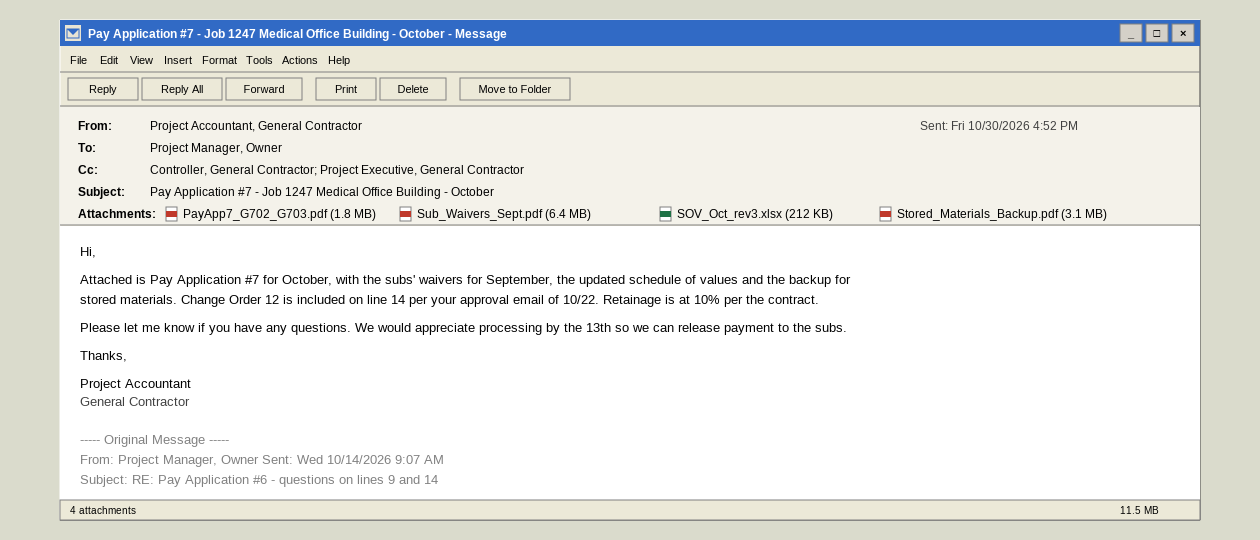
I have watched a pay application leave Procore as a PDF, travel by email, and get typed back into Procore on the other side. Same product, two companies, and the one document that has to cross between them every month went across as paper.
That is the general contractor’s billing cycle in most of the industry. It is worth walking through because the delay in it is where the cash is.
How the owner gets billed today
Commercial construction mostly does not send an invoice. It applies for payment. Once a month the general contractor takes the contract’s schedule of values, enters the work completed and the materials stored against each line, lets retainage come off at the contract’s rate, and produces the pay application, usually on an AIA-style G702 and G703 or something shaped like them. It gets built in project management software like Procore, in a construction ERP like Vista, or by hand in Excel. It goes out as a PDF, with the subs’ lien waivers for the previous period attached.
Then it crosses the company line, and the line is email.
On the owner’s side someone opens the PDF and types it into whatever the owner runs, because the owner needs the application in their own system to get it into their budget. When the owner’s project team wants to check it, the checking happens in Excel: the schedule of values pulled out, last month’s application beside it, the change orders that have and have not been approved, the retainage math. What comes back is an email. Approval, or questions about specific lines.
The questions go to the general contractor’s project accountant, who answers them by pulling the same months of paperwork out of Procore, Vista or the spreadsheet and replying by email. Each round takes days when someone is at their desk and longer when they are not. Then the owner’s internal process runs, the payment is released, and only then does the general contractor have the cash to pay the subs, who have been waiting on the same application and have waivers of their own to exchange for the check.
None of the steps is the problem. Every handoff is manual, and every handoff waits for a person.
Why the paper never left
Why we built Aquifer Accounting made the case that construction’s systems were designed for one office and one server. The pay application is the clearest casualty, because it has to leave the office every month, and it carries the cash. The schedule of values is in the general contractor’s system. The budget it draws against is in the owner’s. Neither system was built with the other in mind, and when they happen to be the same product, the pay application still does not cross from one company’s copy to the other’s.
Part of the reason is that the standard itself is paper. The AIA’s G702 and G703 are forms: a PDF, and a continuation sheet that lives as a spreadsheet, filled in by hand or by software that prints the same page. There is no widely adopted digital standard for the pay application, no agreed shape it can travel in as data from one company’s system to another’s. One attempt, agcXML, which the Associated General Contractors of America and the National Institute of Building Sciences agreed in 2006 to develop, was still revising its RFI schema in 2014, over a decade ago. The two systems on either side of the company line have never had a common language, and the PDF is what a form becomes when it has to leave the building.
So the industry solved it the way it solves everything that crosses a company line: a PDF, an email, and a person on each side keying the same numbers. The tools that came later mostly put the same form behind a portal login.
That is why we built Exchange before we built Accounting. We read what agcXML set out to do, and we built the thing it was reaching for: one way for a document to cross companies and cross software, so a pay application can leave Procore, Vista or Accounting on one side and arrive in e-Builder, the ERP or Accounting on the other. The accounting on each side was already being done. The handoff between them had not been built at all.
What the delay costs
A general contractor is a conduit for cash. Money comes from the owner, most of it goes straight through to subs and suppliers, and many subcontracts pay the sub only when the owner pays. Every day the application sits in a review queue is a day the general contractor floats the job, or the subs float it, or both. The cost is not the typing. It is the wait between a question and its answer, multiplied by the number of questions, multiplied by the number of jobs billing in the same week.
Most of those questions have answers that already exist. Whether a line is overbilled is a comparison of the application with the contract. Whether a change order belongs in the schedule of values is a fact about the contract. Whether the retainage is right is arithmetic. They take days because the answers live in a system the reviewer cannot see, and the person who can see it is doing something else.
What we built, on the general contractor’s side
Contracts and billing keeps each prime contract with its revised value, what has been billed, the balance, the pending changes and the retainage held, and builds the pay application from the contract’s schedule of values. You enter work completed and materials stored, retainage calculates at the contract’s rate, you review the AIA-style G702 and G703, route it for approval, and it goes. Approving an owner change order moves the contract value and the schedule of values together, so the application you build next month matches the contract the owner approved this month.
The application posts to accounts receivable as an invoice with its retainage held, and that is where collection runs from. If the owner pays through the customer portal, by ACH or card, the receipt posts and applies the moment it clears, and the invoice drops off the aging. A check is recorded as a receipt and applied the same way. Either way the office stops answering “has this been paid” by looking in three places.
The lien waivers the owner expects with the application are recorded against the bill or payment each one covers, conditional or unconditional, progress or final, and subs upload theirs through the vendor portal, so you can see which waivers are in, and which are still out, before the application goes out.
Where the line gets crossed
Through Exchange, the pay application leaves Accounting and arrives in the owner’s payables as a record, coded, not as a PDF for someone to key. The owner’s approval, and their change orders, come back the same way. The owner does not need Aquifer. They join on their own guest account, keep the system they run, and decide what they share. If you build the pay application in Procore today, Exchange moves it from there; Accounting is not required for the crossing.
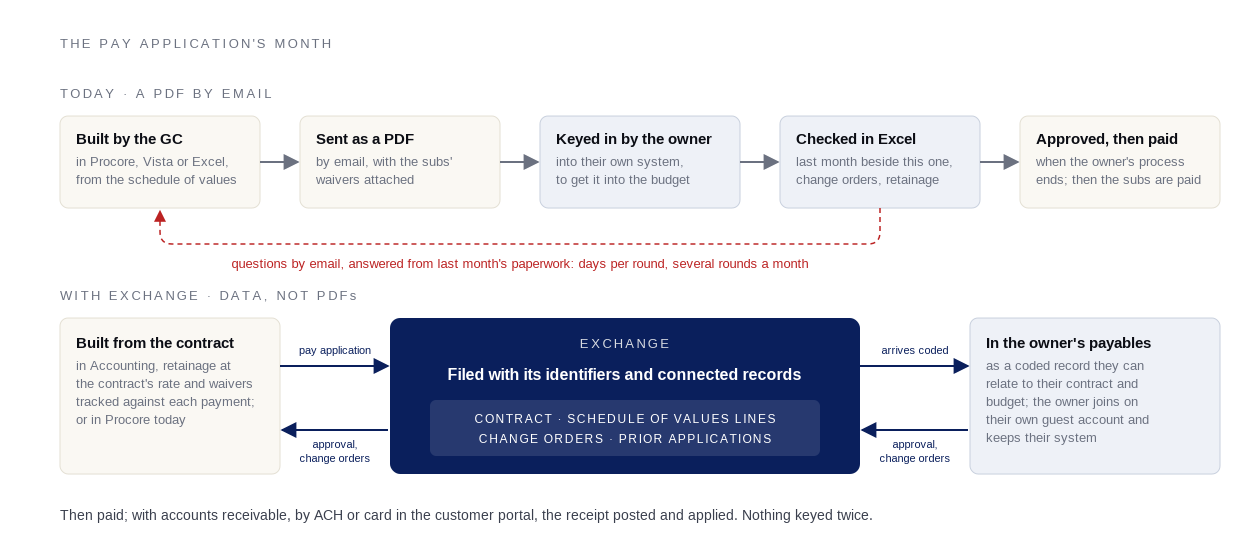
A PDF carries what is printed on it. A pay application filed through Exchange carries its identifiers and the records it is connected to: the contract it bills against, the schedule of values lines, the change orders behind the revised value, the applications before it. Each party’s software holds its own copy of those records; Exchange, the layer between them, is where they are connected to each other across the company line. So the owner’s side receives a record it can relate to its own contract and budget, not a page to key in and reconcile, and the approval or change order that comes back is attached to the same record. That is the context a reviewer in Excel rebuilds by hand every month.
If either side runs Aquifer Accounting, there is a modern accounting system with AI on that side of the line. On yours, the application is built from the contract as it stands, and the status question is answered from the record: ask Aquifer which application is still unpaid and where retainage stands. If the owner runs it, your application is read, coded and routed when it arrives instead of waiting to be keyed, and an overbilled line shows before anyone approves it.
Where this goes, in my view, is that most of the questions get answered before the application is sent, or never asked. The checks the owner’s reviewer runs in Excel are checks against the contract, and software with AI on both sides can run them while the application is being built: issues prevented on one side, resolved on the other. Nobody waits for a person to get back to their desk and open last month’s PDF, because the answer is attached to the application. The month’s cycle shrinks to the owner’s actual decision.
When the owner is not connected
Many owners will not be, for a while. The application still goes out as a PDF, built from the contract and routed through your own approval first. What changes is everything around it. The application is on the record as an invoice with its retainage. The owner can see what you have billed and pay it in the customer portal. The receipt applies itself. The status question is answered without a phone call. The first owner who connects turns the PDF into a record, and your side of the work does not change when they do.
Beside the ERP you have
Contracts and billing, with accounts receivable and its customer portal if you take them, runs beside the accounts payable, job cost and ledger you already have. Jobs, vendors, customers and cost codes match on both sides, so a pay application or a subcontract bill posts where your ERP expects it. Contracts and billing works with Vista, Sage 300 CRE, Sage Intacct, CMiC, Foundation and Procore. Take it on its own, and the ledger stays where it is until you choose to move it.
Where to start
Pick one owner and one document. Set up the integration and route: tell us the system on your side and on theirs, we connect both, the owner at no cost to them, and the first pay application arrives structured with its audit trail. Or start from the billing itself, on the Contracts and billing page.
Subs and suppliers have their own side of this: the pay application to the general contractor, the waiver and the certificate that clear a hold, and seeing where it stands without a phone call. That is the next piece in this series.