

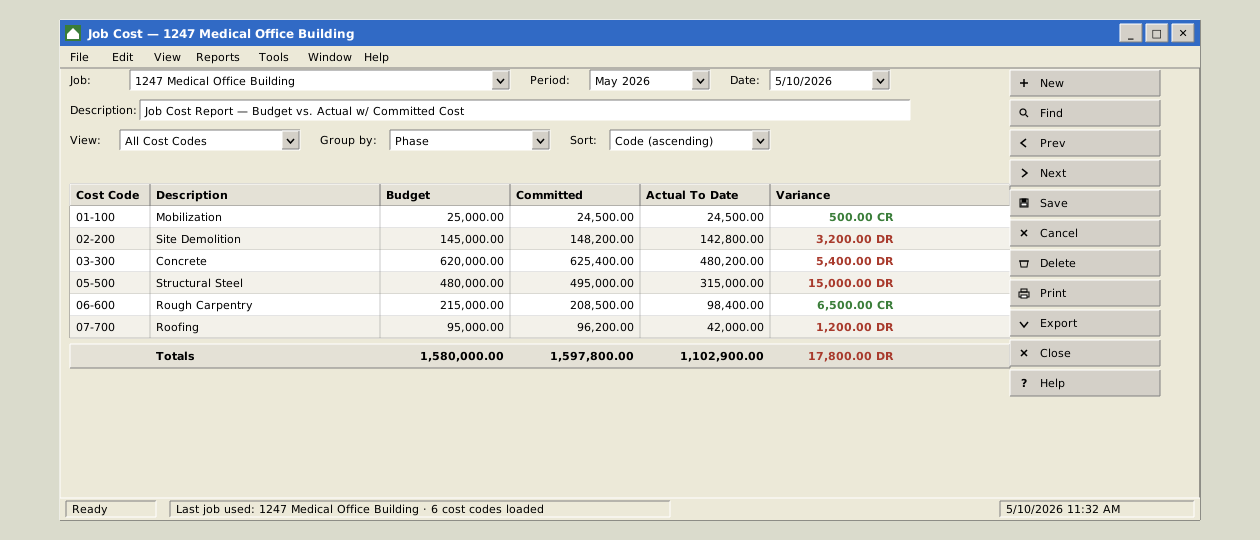
I first saw Sage 300 Construction and Real Estate when I was 19, on a summer job at my uncle’s construction company. It was still called Timberline then. I am 36 now. It looks the same.
Timberline was founded in Oregon in 1971 and sold to Sage in 2003, and for decades it has closed the month for a great many construction companies. The ledger balanced. Payroll went out. The surety got its WIP schedule. It did its job for a very long time, and most of the people who run it know every screen and every workaround by heart.
But the software was designed for a world we no longer live in, and it is not alone. The whole category of construction ERP was designed in another era, and the general ERPs that came after it learned construction later, through editions and add-ons. Both leave the keying, matching and chasing to people. We built Aquifer Accounting because of what we found inside these systems, and we built it to run in sync with the one you have, taking advantage of the AI era we now live in.
Half a decade inside the ERPs
Aquifer began as an integration company. Connecting construction systems to each other means that for more than half a decade our work has been reading the data models of the ERPs construction companies run: Sage 300 CRE, Viewpoint Vista, CMiC, Sage Intacct, NetSuite and the rest.
A data model tells you how a system expects work to be done. Where retainage lives. Whether a cost code is a column or a table. What an approval is: a status, a row nobody reads, or a feature a partner sells separately. How a payment to a subcontractor knows whether the lien waiver came in. Read enough of them and the same picture forms every time: the system holds the records, and a person does the work between them.
The ERP is responsible for a lot. The ledger, job cost, contracts and billing, accounts payable, accounts receivable, payroll, equipment, the month-end close, and the reports the bank and the surety ask for. In many construction companies one system has carried all of that for decades, which is why a design from another era costs more than it looks.
The state of the systems
Every Aquifer Accounting module runs in sync with each of these, so you don’t have to boil the ocean. You can use what will help you the most, and eventually fully switch if you’d like.
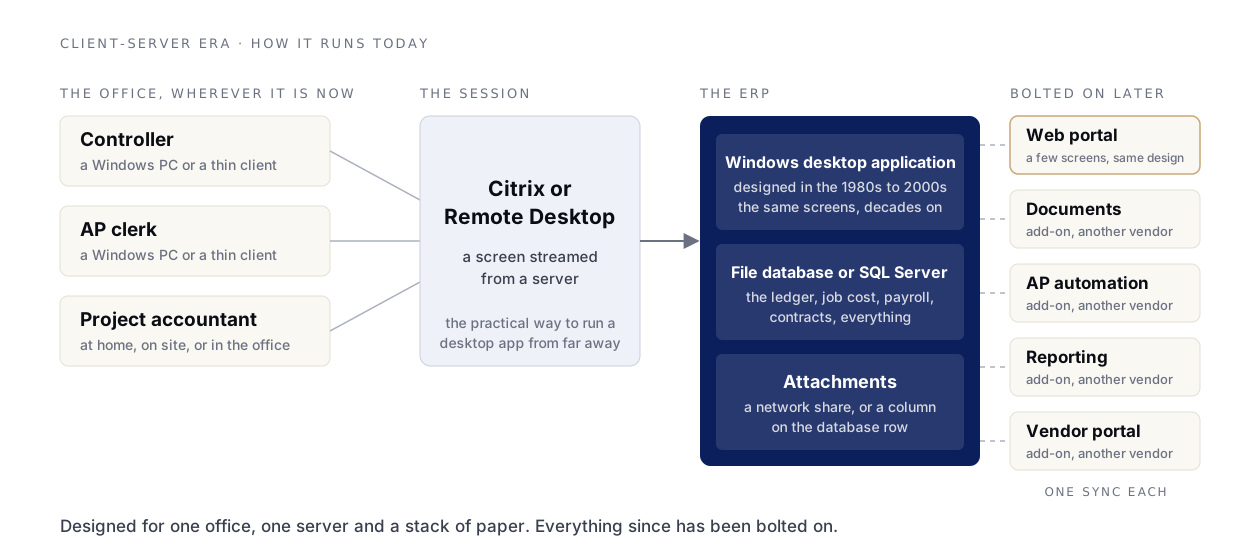
Sage 300 Construction and Real Estate is a Windows desktop application from the client-server era, running on what is essentially an eighties file database. A great many companies reach it through a Citrix or Remote Desktop session, because that is the practical way to run a desktop application for an office that is no longer in one building. The web pieces that exist were bolted on later, slapping on a semi-shiny veneer. Almost every system on this list has one of these veneers.
Viewpoint Vista comes from a company that dates to 1976 and has been owned by Trimble since 2018. It is a Windows client talking to a Windows server and SQL Server, and its move to the cloud was just hosting it in Azure instead of hosting it yourself. Even Vista has a web component now, and it is the same veneer: a few screens bolted onto the same design. It lacks a native API and the only path outside of direct database connectivity is a data sync platform Trimble bought in 2023. It stores attachments in the SQL Server database row itself, so every PDF the office ever attached sits in the database instead of cloud storage.
CMiC was founded in Toronto in 1974 and runs in a browser today, but the browser version was a drop-in replacement for the old client rather than a new front end built around how customers work now.
NetSuite, founded in 1998 as NetLedger, and Sage Intacct, founded in 1999, are better. They were built for the browser, and a company can hire for them. But the general ERPs moved the design from the client-server era to the beginning of the web era: from the eighties and nineties to the nineties and 2000s. At the bones these systems are still dated. NetSuite will not let a script handle a file over ten megabytes, and a script is the path an integration uses to attach one. Intacct caps the attachment on a bill at twenty. And construction arrives as an edition, an add-on or a consultant’s configuration rather than in the core: retainage, G702/G703 billing, certified payroll.
Acumatica, a 2008 spin-out of Parallels, is the most modern of the group and runs in the browser. The platform beneath it has not changed much in the years we have worked against its API. It is also an ERP in the full 1990 sense of the word, which we will come back to.
Then there are the add-ons. Every one of these systems has a market of bolt-on modules that make it a little better: a document-management add-on, an AP-automation add-on, a reporting add-on, a portal add-on. Each covers one screen the core never got around to. Each is one more vendor, one more sync and one more place the data has to agree. In the offices we connect to, we often find several.
How the software kept construction on paper
A contractor bills from a schedule of values, holds retainage, exchanges a lien waiver for a payment, and holds a payment until the certificate of insurance is current. Those contract terms are real and they stay. What froze was the handling around them. Purchase orders, invoices and paper check payments are still the daily work, and other industries have fewer of these manual paths. The software was designed around them and kept them in place.
So the construction accounting office still spends its day keying a PDF into a screen, printing the check, answering the phone when the sub calls about it, retyping certified payroll onto a WH-347, rebuilding the WIP schedule in a spreadsheet at quarter end, and reconciling a second job cost ledger to the general ledger at month end. The industry did not refuse to modernize. The systems carried the paper era forward.
Why we call it Accounting and not an ERP
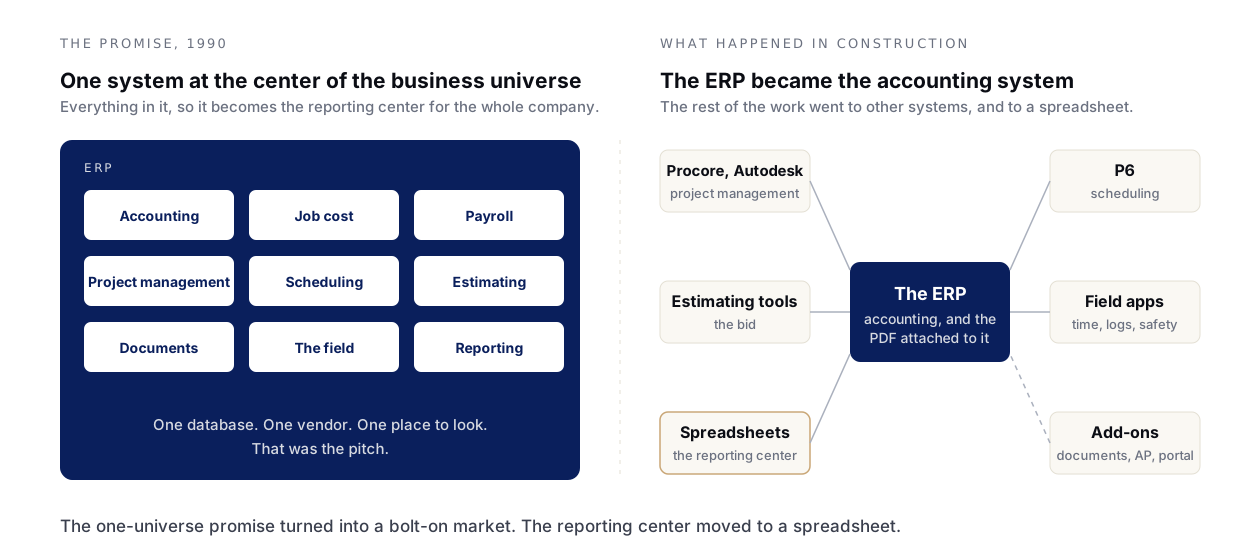
Enterprise resource planning is a term Gartner coined in 1990, and it was a marketing idea as much as a technical one: one piece of software at the center of the business universe, with everything in it, so that it would become the primary reporting center for the whole company.
In construction that never quite happened. Project management went to Procore and Autodesk. Scheduling went to P6. Estimating went to its own tools. The field went to a dozen apps. What the ERP became was the accounting system, and the one-universe promise turned into the bolt-on market above. The reporting center moved to a spreadsheet.
So we did not build an ERP. We built an accounting app that does accounting’s whole job and expects to sit beside other systems, because that is how construction companies actually run. There is a platform underneath it, the same one under our Scheduling, Coordination and Canvas apps, and that is the second conversation. The first one is accounting.
What we built
Every module runs on its own and stays in sync with the ERP you run today. Aquifer Accounting was built this decade, with AI as part of the product rather than an add-on, and an approval, a timesheet or a bill review reads the same on a phone as at a desk. It is six modules, each available on its own, and a portal for vendors and customers that comes with accounts payable and accounts receivable.
- Accounts payable reads invoices as they are. Forward or upload the PDF and Aquifer AI reads it, matches the purchase order, codes it from the vendor’s history and posts within your threshold or asks for approval, with the PDF beside the drafted bill and the flags in plain words: over PO, over subcontract, duplicate, insurance expiring. Pick the bills to pay and one payment per vendor is drafted, by check or ACH.
- Accounts receivable bills owners and customers from one list, and a customer portal lets them see what is open and pay it by ACH or card, with the receipt applied the moment it clears.
- Contracts and billing generates the pay application from the schedule of values, calculates retainage at the contract’s rate, routes the AIA-style G702/G703 for approval and sends the PDF. Lien waivers are recorded against the bill or payment they cover, and certificates are recorded with their policies and limits. A payment to a sub missing a required waiver or certificate is held until someone with the authority overrides it, with the reason kept.
- Job cost carries job, phase and cost code on every transaction from the day it posts, so budget vs actual, commitments and the WIP schedule read from the same figures as the ledger, and there is no second job cost ledger to reconcile at month end.
- Payroll and time approves hours once and flows them into the pay run, certified payroll and the job’s labor cost, with union rate tables built in and prevailing wage turned on per job.
- Ledger and reporting reconciles the bank from an imported statement, consolidates every entity you run, and governs every change with approval chains, separation of duties and an audit log.
- The portal gives vendors and customers a link and an access code, with no account to create. They see every recent invoice and any older one still open, every payment with its method, and anything holding a payment up, with what to send to clear it. Vendors upload the waiver and the certificate and keep their bank details current. Customers pay what they owe online.
Unlike an add-on, each module is part of one accounting app. Every transaction carries job, phase and cost code, approvals and the audit log work the same in every module, and reports across modules agree because they read the same ledger.
Beside the ERP you have, not instead of it
Integrations matches vendors, jobs and cost codes on both sides, so a bill posted in Aquifer lands in your ledger coded the way it was approved, and nobody keys anything twice. Take accounts payable and leave accounts receivable, job cost and the ledger exactly where they are. Add the next module when the office is ready. Move the ledger over when you choose, on your timeline, or never.
Nobody has to rip anything out. If your ERP works and your team is fluent in it, that is worth a great deal, and this is not a call to break it. The modules exist so the parts of the work that hurt most can move to software built for them while the rest stays put.
Where to start
Many companies start with accounts payable, where the work hurts most, and the way in asks nothing of your ERP. Send us twenty real invoices, as the PDFs you received. They come back read, coded to project and cost code and routed, side by side with how the same invoices move through your process today, with a written plan for running AP beside your ERP. Nothing is written to your system.
Or start wherever it hurts most. See the Accounting modules, each on its own page.